
Press your hotkey
Tap once in toggle mode, or keep hold-to-talk on if you prefer. AudioBud sends the transcript when recording stops.
Windows x64 · macOS release candidate
AudioBud turns one hotkey into fast, private speech-to-text in whatever app you already have open. Your audio stays on your machine.
One shortcut. Zero detours.
No recorder window, no copy-and-paste shuffle, and no cloud wait. AudioBud works where you are already writing.
Tap once in toggle mode, or keep hold-to-talk on if you prefer. AudioBud sends the transcript when recording stops.
Local voice activity detection trims silence while your chosen model handles the words.
The transcript lands in the focused text field by clipboard or direct typing.
Built for real dictation
A focused settings surface gives you control without turning a simple dictation tool into a dashboard.
Speech recognition runs locally. Audio is not sent to a transcription service, and AudioBud does not require an account.
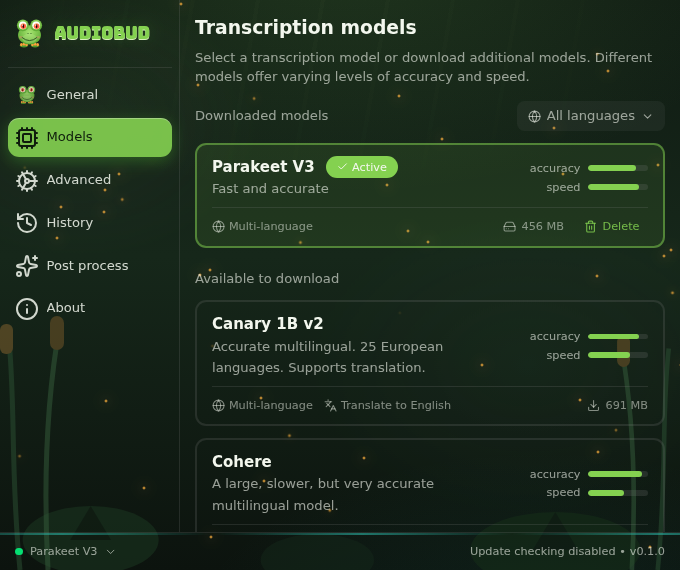
Pick Parakeet, Whisper, Moonshine, SenseVoice, Canary, Cohere, and more from inside the app.
Custom words, replacements, number formatting, raw mode, retention controls, and optional post-processing.
Make it yours
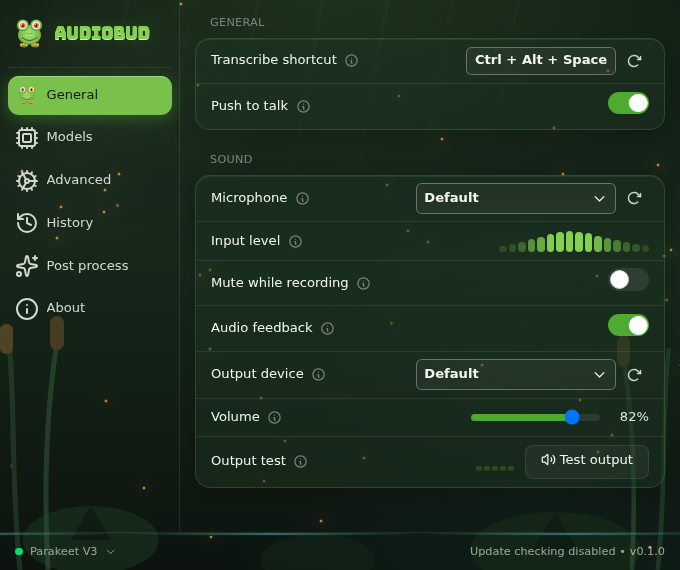
Choose input and output devices, toggle or hold-to-talk behavior, feedback sounds, overlay position, paste method, and history limits from one calm interface.
Choose your engine
Whisper Turbo is recommended on Apple Silicon Macs. Parakeet V3 remains the Windows default, and other local engines cover more languages and specialized jobs.
Fast multilingual Windows dictation. Mac users can run it on the CPU without NVIDIA hardware.
Broad language coverage with Metal acceleration on Apple Silicon. Whisper Small is the lighter option.
Moonshine, SenseVoice, GigaAM, Canary, and Cohere fill speed and language niches.
Windows downloads · macOS release candidate
The macOS release candidate targets Apple Silicon Macs running macOS 11 or later. The public DMG is not available until clean-Mac, remote candidate, and exact draft-asset checks pass.
After the Mac release is published, updates will be manual: use AudioBud's release link to download and install the next DMG. For U.S. users, the Microsoft Store remains on its current Windows release until the Partner Center update is accepted. New Store installs use the signed NSIS package and AudioBud's signed update feed. Still on the original Store MSI? That package cannot receive in-app updates. Uninstall it in Windows Settings, then install from the Store again or run the current NSIS setup executable once. Later releases can then arrive through AudioBud's signed update feed. Direct downloads remain available for portable installs and deployment tooling. Verify a direct download.
Before you install
Windows installers are signed and timestamped. The planned Mac DMG is signed and notarized. Confirm that a direct download is genuine before running it.
When Edge says a file isn't commonly downloaded, SmartScreen is reporting how many people have downloaded that exact build so far. The count says nothing about what the file does, and every release starts at zero no matter who signed it. AudioBud is a small project, so new versions will trip this for a while.
To continue, choose Keep in the download list, then More info and Run anyway if Windows prompts again. Read the publisher name before you accept.
Right-click the installer, open Properties, then the Digital Signatures tab:
The publisher has to read Joseph Amditis. Microsoft rotates the number ending the issuer, so a different two-digit suffix there is normal. Refuse a download that names anyone else.
A valid signature covers the signed parts of the installer rather than every byte, so it cannot stand in for the checksum below. Run both checks.
Before any Mac release is published, Gatekeeper must accept its DMG as Developer ID Application: Joe Amditis (5624SD289G). Stapler must also validate its notarization ticket:
spctl --assess --type open --context context:primary-signature -v "./AudioBud_<version>_macos_aarch64.dmg"
xcrun stapler validate "./AudioBud_<version>_macos_aarch64.dmg"Latest release
Published by GitHub for the release assets. Compare against your own copy before installing.
macOS: shasum -a 256 "./AudioBud_<version>_macos_aarch64.dmg"
Windows: Get-FileHash -Algorithm SHA256 .\AudioBud_<version>_x64-setup.exe
A matching hash means the file arrived intact. A mismatch means it was corrupted or replaced in transit, so delete it and download again from the releases page.